Function
Set once, used everywhere.
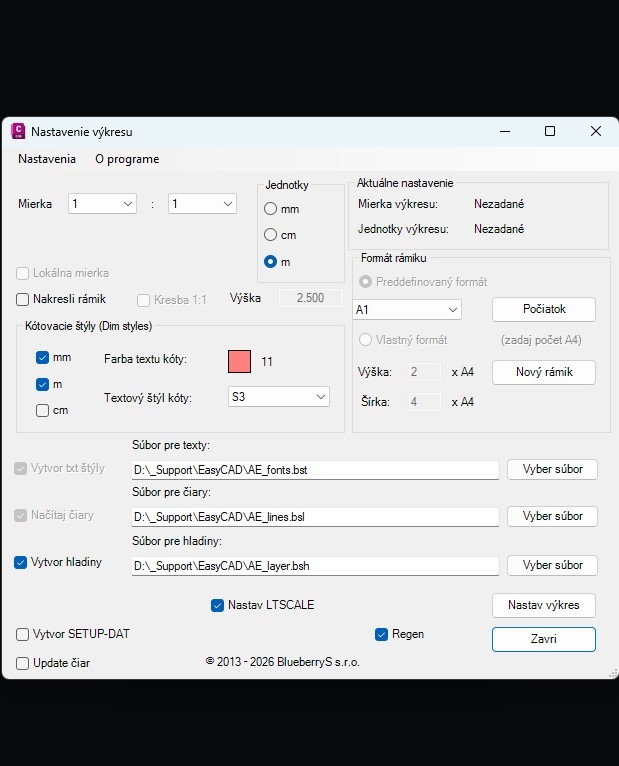
Before you start drafting it is crucial to have the drawing set up correctly — layers, text styles, dimension styles, scale, frame format. Easy CAD centralises this setup: you define it once according to your organisation's conventions and it is applied automatically to every new drawing. The other Easy Bridge® and Easy CAD modules respect this setup — text, blocks and dimensions are always inserted into the correct layer, in the correct style.
- Automatic creation of layers according to the organisation's configuration file
- Loading of text styles and line types from the standard files
- Setting the drawing scale — read into the title block and the dimension styles
- Choice of frame format — predefined (A1, A2, A3, A4) or a custom number of A4 sheets
- Setting of dimension styles for mm, cm, m — each with its own colour and text style
Dimension styles
The right dimensions for every scale.
Dimensioning at different scales places different demands on the size of text, arrows and offsets. Easy CAD can quickly generate a set of dimension styles for any scale — whether you draw 1:1 or work with enlarged details. For organisations that do not yet use annotative text and dimensions, this is a reliable alternative with full control over the resulting drawing.
- Quick generation of dimension styles for a given scale
- Support for 1:1 drafting as well as enlarged drawings (details, schemes)
- An alternative to annotative dimensions for organisations with a traditional workflow
- Every dimension style configurable — text colour, text style, arrow size